Features
Features: proposal software built to sell
Propozit turns your price list, cases and story into a branded slide deck your client can read, price and sign. It is in early access: most of it is in accounts today, some of it you can try in the live demo, and some of it is next on the roadmap. Each part below says which.
- Available
Interactive pricing
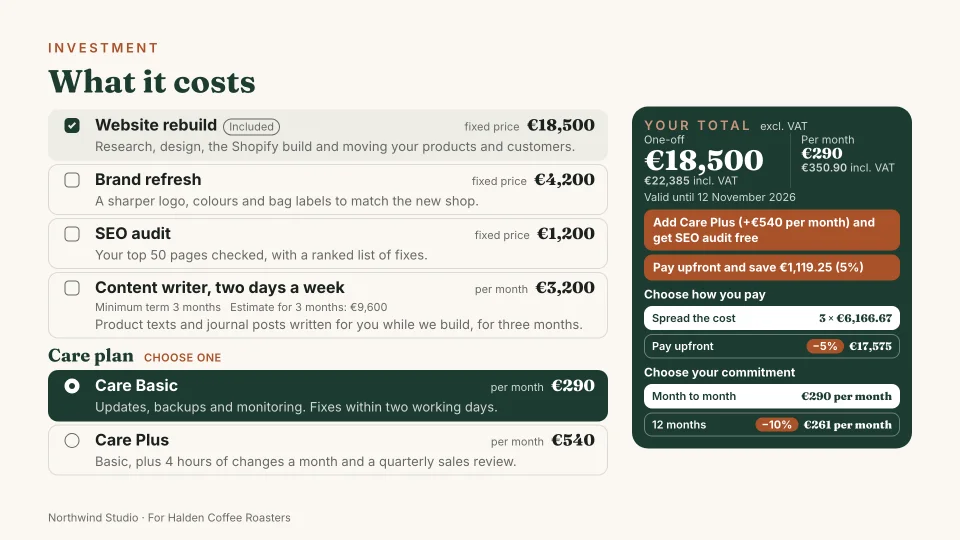
Your client ticks extras, picks a plan and a payment option, and the totals update as they go. Rules and deals you set keep every discount in check.
- Available
Slide library
Slides for every part of the pitch, from cover to agreement: all 19 types in the deck editor, with cases from your library, and 11 in the live demo. Each one measures its content and fits it to a 16:9 page.
- Available
Signing
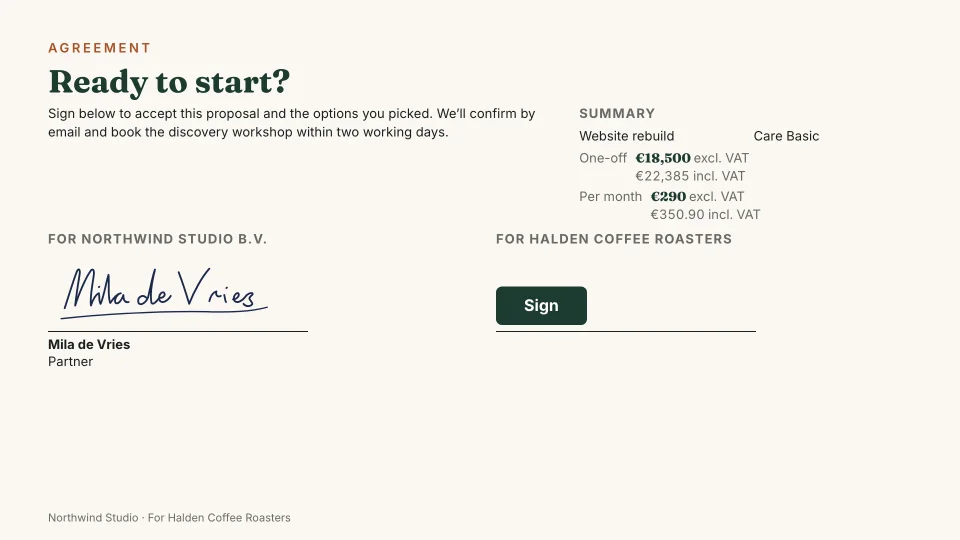
The client unlocks the deck with an email code, picks options and signs, drawn or typed. Both sides get a signed PDF of the exact version they agreed to.
- Available
Tracking
See when a proposal is opened and how long each slide is read, so you follow up while it is still on their mind.
Your brand on every slide
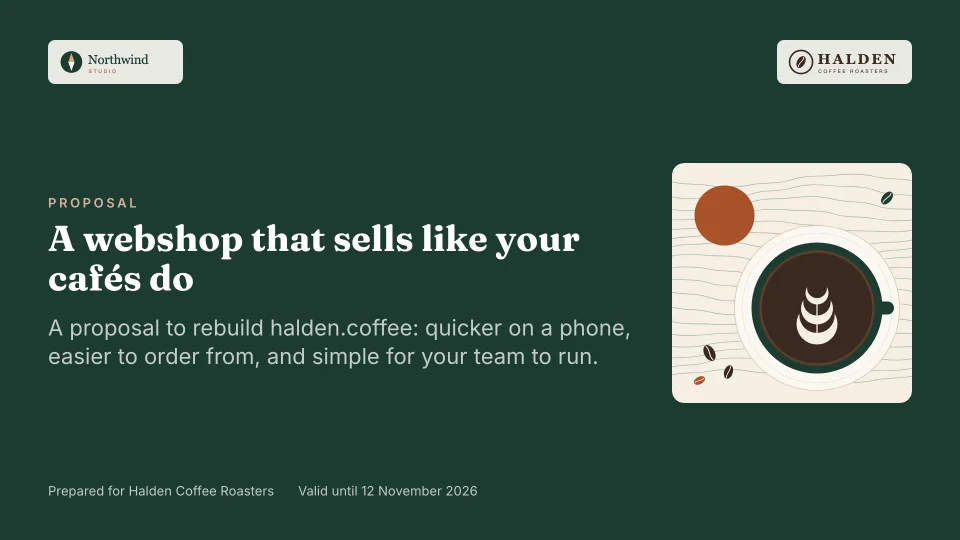
Every deck follows your brand. Opening and closing slides are filled with your main colour, story slides sit on a soft tint of it, and the rest on your background, so the deck has the light and dark rhythm of a designed pitch. Small titles in your second colour sit above most headings, a footer carries your name, the client and the page number, and prices and totals are set in heavy figures.
Colours are checked for contrast as the deck is drawn: when your second colour is too light for small text on white, a darker shade of it is used. You can set each slide's background to Auto, Light, Soft or Dark. Solid colours only, no gradients.
Pick one of five designs for a deck: Classic, Bold, Studio, Editorial or Minimal. A design changes the type, the corners and the layouts, and never your colours. Section, thank-you, testimonial and challenge slides can take a background photo, and Propozit works out the overlay so the text stays readable, with solid colours and no gradients; a deck holds up to six. Sixteen fonts are self-hosted, so your clients' browsers load them from us, not from a third party.
What you can do today
We would rather you knew exactly where things stand than find out after you sign up. This list changes as each part ships.
- Create an account with a one-time code sent by email (no password) Available
- Set up your organization: its name, proposal language and currency, how you speak to clients (formal or informal), and company details such as legal name, VAT number and address Available
- Set your brand (four colours, a heading and a body font, your logo) and see it on a live deck preview Available
- Invite your team as owners, admins or members, each with the right access Available
- Data stored in the EU: Supabase and AWS, both in Frankfurt. The AI features currently run on Anthropic in the US Available
- The deck editor: all 19 slide types beside a live preview, fitted to the page, in English, Dutch, French or German Available
- Your price list: six product types, prices per currency or on request, deals, and rules you write yourself Available
- Pricing in your decks: options, plan choices and deals with live totals, payment plans the client picks, due days and an extra-work rate Available
- VAT per proposal: your own rates, such as 0% with a note for a client abroad, on prices with or without VAT Available
- Versions with notes, undo and history, and a private preview link Available
- Your library: cases with images and saved slides to reuse in any proposal Available
- Clients with their own details, contacts, VAT and prices. Start a proposal from a client and it fills in. Available
- Cases with a tagline, numbers and a client quote; a card in a proposal, and a long case on its own pages in a portfolio Available
- Portfolios: pick your cases and get a deck to send, with the same link, tracking and read time Available
- An Overview with what needs your attention, this month's numbers, your pipeline and recent activity Available
- A short tour of the app and the editor the first time you use them, and again from Help Available
- Your client ticking options and picking plans in your own decks, with nudges Available
- Your brand on every slide: dark, soft and light backgrounds, small titles in your second colour, and a footer with page numbers Available
- Five deck designs: Classic, Bold, Studio, Editorial and Minimal, in your own colours Available
- Background photos on section, thank-you, testimonial and challenge slides, with text that stays readable Available
- Sixteen fonts Available
- Pricing that sells: rows as cards, a total card, discount pills, gifts with their value, costed nudges, and add-on people Available
- In the steps: people from your price list, a fixed project priced by who works on it, optional and add-on people, “Ticked at the start”, a plan for the client to pick, and bonuses Available
- Checks before you send: a missing project price, a team or length that does not match the prices and the timeline, and a mix of formal and informal address Available
- Sending a proposal from Propozit, with a 6-digit email code to open it Available
- Signing in the deck, drawn or typed, and a signed PDF for both sides Available
- After signing, your client sees how to pay: your bank details, a QR code for their banking app, and your own pay link Available
- Opens and read time per slide, and statuses that follow what happened Available
- Clients can ask for a change beside Sign; you get an email and see it on the proposal. Available
- Engagement templates: a fixed package, a fixed-price project, a monthly team, a retainer, dedicated people, an audit and rescue, building work and product quotes Available
- Starters for building work and product quotes: their own texts, example price lists and payment schedules Available
- Price rows grouped by room, trade or product group, with subtotals Available
- Products with a photo and an article number Available
- Import and export your price list and clients as a spreadsheet (CSV) Available
- Your own standard for each type: default products, texts in four languages, the schedule, deals and cases Available
- Build a proposal in steps, also on your phone Available
- Install Propozit from your browser on your phone or computer: a web app on your home screen, not an app-store app, and not offline Available
- Help inside the app: common questions for each page, search, and a link to ask us Available
- In the steps: type in a scope or list line to change it, and Undo brings back one you removed Available
- Add a case study from the steps, saved to your library, without leaving the proposal Available
- Setup from your website: your brand, company details, prices, cases and team, found with the help of AI and suggested for you to check Available
- No prices found in setup? Try a different page of your own website, such as your pricing page Available
- Proposal AI: describe a proposal and get a draft deck from your own prices, cases and template Available
- Ask the AI for changes: say what should change and apply it in one step, with prices only from your price list Available
- Clients can decline a proposal Available
- An API for your own tools Available
- Webhooks when a proposal is sent, opened, signed or declined Available
- Search, filter and sort your decks, clients, price list and library Available
- A Trash with Restore for 30 days Available
- Collapse the sidebar Available
- Plans and billing: Free, Solo, Team and Agency, monthly or yearly, paid by card through Stripe Coming soon
- Your own sending domain Coming soon
Why proposals as decks
Most proposals are long documents or a PDF exported from a slide editor. Both are hard to read on a phone, and both freeze the price the moment you send them. If the client wants the cheaper care plan or the extra audit, it is another email and another version.
A Propozit deck reads like a pitch: a cover, the challenge in your words, your approach, the team, the cases that prove it, then the investment. The pricing slide is live, so the client builds the version of the deal that suits them, inside the limits you set. On a phone the same deck becomes one easy scroll.
Set up once, reuse everywhere
Your brand, company details and team are set once, in settings, and every deck starts from them. Your price list works the same way: products, subscriptions and hour bundles you define once and tick per proposal, so prices stay the same whoever on the team sends the deck. A long price list or client list can be imported from a spreadsheet saved as CSV, and exported again.
Brand, company details, team and the price list are in accounts now, and so is the deck editor with a live preview. You send the deck to a client from the editor, and the live demo shows the deck your client sees.
Your cases also make a portfolio: pick them and Propozit builds a deck with no prices and no signing, sent with the same link, opens and read time as a proposal.
Quotes for building work and for products
Tell Propozit your business type and it suggests the right template: Building work for renovation and installation, or Product quote for goods, each with its own texts in English, Dutch, French and German and a payment schedule. Prices can be grouped by room, trade or product group, with a subtotal for each group, and products carry a photo and an article number. Example price lists show the way. VAT is one rate per proposal for now, so a quote cannot mix 9% and 21%. The help article has the details.
Get paid after signing
Add your bank details and your own pay link once, under Settings, Payments. After your client signs, they see a pay card with the amount due now, your IBAN, a reference for each instalment and a QR code their banking app can scan: the SEPA code for euro, PromptPay for baht. Your pay link shows as "Pay online". The same details are in the signed email and the signed PDF. Your client can press "I've paid" to tell you, and only you can Mark as paid. Request payment emails them a reminder, up to three times a day for each instalment. Propozit doesn't handle the money: your client pays you directly. See how it works.
Start from your website
You can also start from your website. Enter its address and Propozit reads up to 10 public pages, the way a search engine does, then asks you to confirm your logo and colours, your company details, what you sell with its prices, your cases and your team. Nothing is saved until you say so, and without a website the same screens open empty. It also works when no AI is available, by reading the structured data many sites publish about themselves. How it works.
Describe it, get a draft
On New proposal, describe the work the way you would tell a colleague: who it is for, what you will do, roughly how long, who works on it and the extras the client can add. Propozit drafts the whole deck from your own template, price list, cases and clients, then opens it in the steps with a summary of what it chose, what it could not find in your library and the figures to check.
It uses only your own price list and cases; it never makes up a price. Check the draft before you send it. How it works.
In the editor or the steps, select Ask AI and say what should change: shorter text, a new phase, an extra from your price list, another language. You see every change, with the price effect, before you apply it, and one Undo takes it back. It never changes a price or sends anything. Ask the AI for changes.
Stored in the EU
Supabase stores the database and handles sign-in, and AWS hosts the application, both in Frankfurt (eu-central-1). Sign-in uses one-time codes sent by email, so there are no passwords to leak. The privacy page lists everything we collect.
AI processing is not in the EU yet. For now, website setup and the proposal AI use Claude by Anthropic, through Anthropic's API, which processes the data in the United States. Anthropic does not use it to train its models, and we plan to move AI processing to an EU provider. Setup from your website also uses a second AI service; the privacy page says where it runs. The proposal AI uses only Claude. It gets your description and the proposal data it needs: your organization's name and type, your products and prices, deals and bonuses, add-on people's roles and rates, your cases (titles, clients, tags, taglines, summaries, numbers and results), client names and the template texts. When you ask for changes: your message, the last few messages, the proposal's text and its price lines (names and quantities), with your products and prices and your cases. Nothing goes to SubQ or Jev for this.
What it costs
Propozit is free during early access; paid plans come later (planned: Solo $15, Team $39 and Agency $99 a month, excl. VAT). Plans are per organization, with seats included. See the plans.
Related
Proposals your clients actually say yes to
Propozit is free to start, with no card needed. Create your account today and see the plans on the pricing page.