Features
Proposal e-signature and client unlock
Your client accepts the proposal inside the deck itself, with the options they picked. They unlock it with an email code, sign it drawn or typed, on a phone or a laptop, and both sides get a signed PDF of exactly that version.
What the labels mean
- Available
- In Propozit accounts today.
- In the live demo
- Built and public in the live demo.
- Coming soon
- On the roadmap, not built yet.
From link to signature in four steps
-
Unlock
Your client opens the link and enters a code sent to their email address.
-
Choose
They pick options, a plan and a way to pay on the pricing slide.
-
Confirm
The agreement slide sums up their choices and the totals.
-
Sign
Name, role, and a typed or drawn signature. Done.
No PDFs going back and forth, no separate e-signature tool, and no printing and scanning. The deck becomes the agreement.
Unlock with an email code
A proposal holds your prices and your client’s plans, so it should not open for anyone who happens to find the link. Decks are private by default. Your client enters their email address and, if it is one you gave access to, gets a six-digit code. Entering it unlocks the deck on that device, and ties what happens next, the choices and the signature, to that address.
It is the same kind of code you use to sign in to Propozit today, so there are no passwords for your client to make up or forget.
You decide who may open it in the editor under Access: only the addresses you list, everyone at a domain with *@company.com, or anyone with the link. Signing always needs the code.
The choices are part of the agreement
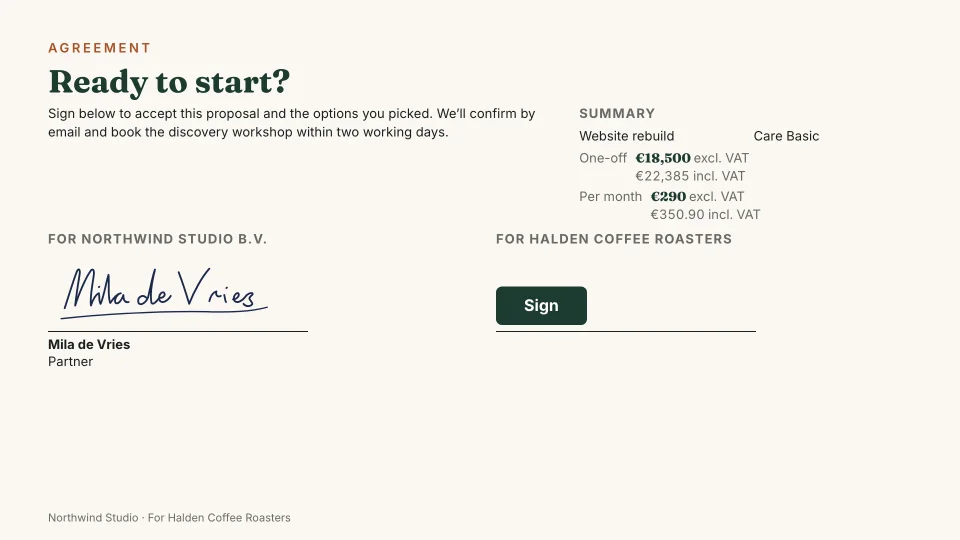
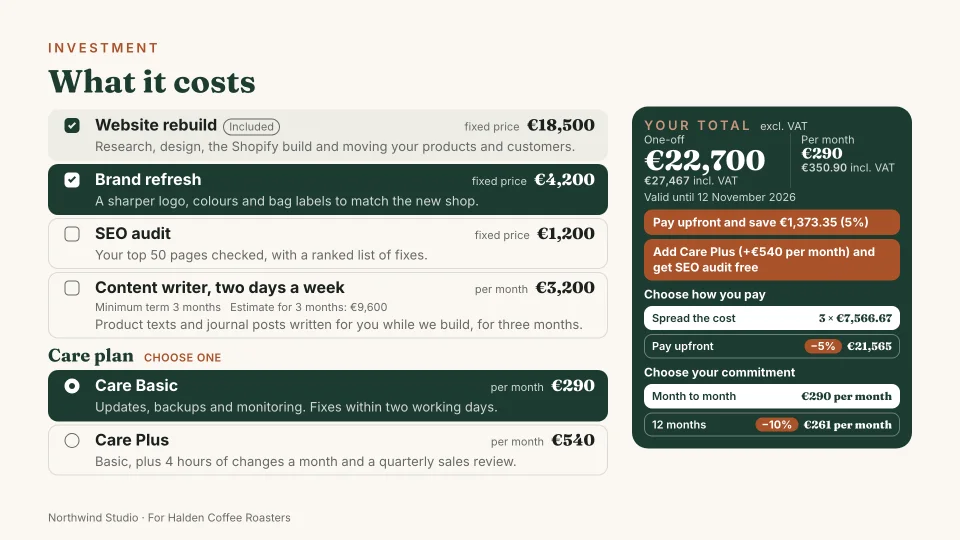
With interactive pricing, the client shapes the deal: which extras, which care plan, upfront or spread over three months. When they sign, those choices are what they sign for. The agreement slide sums them up with the one-off and monthly totals before they confirm, so nobody is surprised by the invoice.
The agreement slide is at the end of the deck, and you can see it in the live demo. Then they press Sign.
A typed or drawn signature
To sign, your client confirms, gives their name and role, and types or draws a signature, with a mouse, a trackpad or a finger on a phone. It is a simple electronic signature, not a qualified one: a clear record of who agreed to what, and when, which is what most agency and freelance work needs day to day.
Once signed, the signature appears on the deck's agreement slide, next to yours, for your team and the people the deck was shared with.
The signature on your side is always the contact person's own. It only shows if an admin has allowed them to sign for the company in Settings, and only on versions they publish themselves.
A signed PDF with a SHA-256 hash
Once signed, both sides get a PDF of the exact version and choices that were signed, by email. The totals are worked out again by the same pricing engine at the moment of signing, then frozen with the choices. Propozit stores the PDF with its SHA-256 hash, a fingerprint of the file. If the file is changed in any way later, the hash no longer matches, so any change to it shows.
That gives you something better than a reply saying “looks good, go ahead”: a dated record you can file with your contracts and point to if a question about scope or price ever comes up.
Related
Proposals your clients actually say yes to
Propozit is free to start, with no card needed. Create your account today and see the plans on the pricing page.