Features
Interactive pricing proposals clients can play with
A price in a PDF is a take-it-or-leave-it number. In Propozit the pricing slide is live: your client ticks extras, picks a plan and a way to pay, and sees the totals change as they go. The same pricing engine runs in your decks in accounts and in the live demo. Try it below.
Smart pricing
Pricing your client can play with
Live totals, and “Save €X” nudges that sell the upgrade.
- Fixed-price projects and monthly subscriptions, side by side
- Optional extras, plan choices, payment plans and commitment deals
- Rules like “SEO audit free with Care Plus”, applied for you
- One price list with products and hour bundles
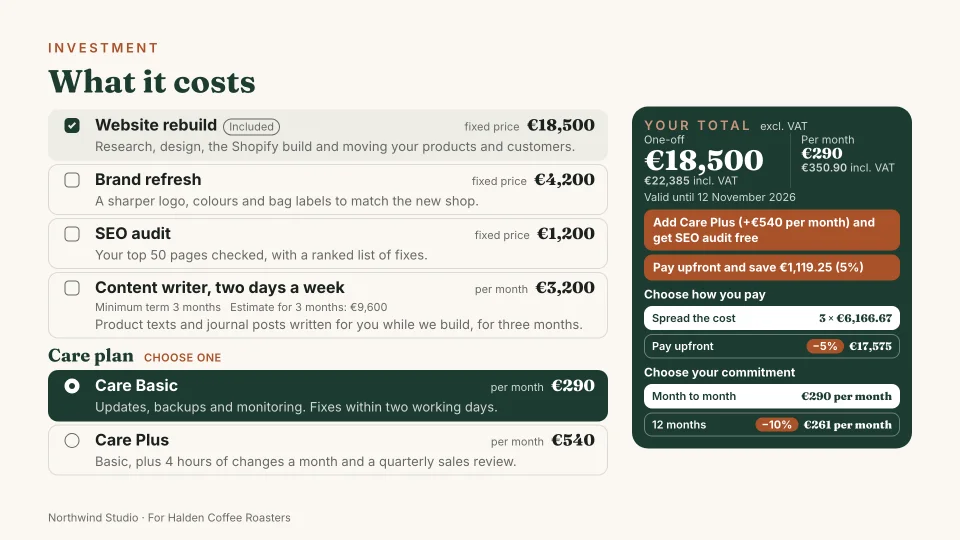
Loading the live pricing…
In the live demo Try it: this is the pricing slide from the live demo, a proposal from Northwind Studio to Halden Coffee Roasters.
What the labels mean
- Available
- In Propozit accounts today.
- In the live demo
- Built and public in the live demo.
- Coming soon
- On the roadmap, not built yet.
Projects and subscriptions side by side
Agencies rarely sell one kind of thing. A website is a fixed-price project; hosting and care are a subscription. The demo prices them on one slide: a €18,500 rebuild and two optional extras as fixed-price projects, a content writer at €3,200 a month for at least three months, and two care plans as monthly subscriptions, in euros. Your own price list works the same way.
Every other way you charge
These are not shown in the demo, but you can add them to your price list today:
- Projects built up from roles and days, and teams of several people per month or per day.
- Subscriptions billed yearly.
- Products with a quantity and a unit, such as licences, workshops or photo days.
- Hour bundles and hourly rates, for support and extra work.
- Prices “on request”, shown on the slide but kept out of the totals.
- Prices per currency, so the same line works in a euro deck and a pound deck.
Options and plan choices
Each line is included, optional or one of a choice. Included lines are always in. Optional lines are extras the client can tick, such as the brand refresh, the SEO audit and the content writer in the demo. Choice lines form a group: Care Basic or Care Plus, one of them required. You decide which options are ticked when the client first opens the deck. You set this up per line in the pricing view.
This is what makes a proposal feel like a conversation. Instead of three separate quotes for good, better and best, the client sees one page and builds the version that fits their budget.
Deals: payment plans and commitments
Deals reward the client for how they pay or how long they commit. In the demo, the rebuild can be paid upfront for 5% off, or spread over three monthly payments; the care plan can run month to month, or for 12 months at 10% off. A deal applies only to the product types you choose, so a commitment discount never touches the one-off project. You keep your deals in the price list and switch them on per proposal.
Rules that keep discounts in check
Rules give something back when a condition is met, like “Add Branding and the SEO audit is free”. You write them in the price list and switch them on per proposal; the live demo has one, “SEO audit free with Care Plus”.
Because the rules are set by you, every discount in the deck is one you agreed to in advance, whoever on the team sends it.
Rewards and conditions you choose
A rule can make a product free, take a percentage or a fixed amount off, or add free months or extra hours. It applies when the proposal includes a product, type or category, reaches a number of lines or a subtotal, when a deal is picked, or when the client signs before a date. The rules screen reads each one back as a plain sentence.
Nudges that sell the upgrade
The engine works out which one or two clicks would save the client the most, and shows it beside the totals: pick Care Plus and the SEO audit is free; commit for 12 months and save 10% on care. One click applies it. Nudges come from your own deals and rules, so they never offer something you did not set up.
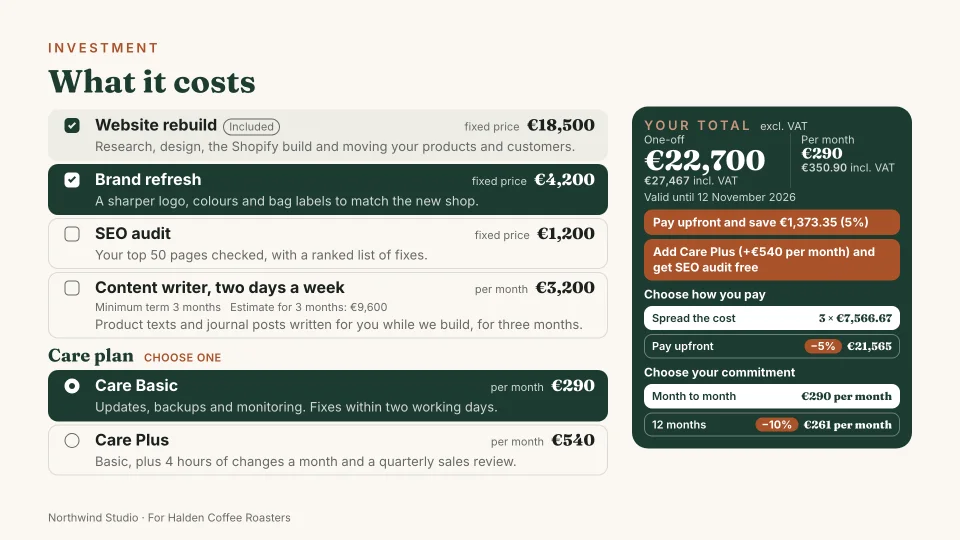
Add-ons, gifts and savings that sell
Your client can add more than products. Offer a person as an add-on, such as a senior developer next to the team, and the monthly total rises the moment they tick it. In the demo, a content writer two days a week is one tick away.
Savings read as good news. A discount shows as a “−10%” pill next to the price, never a struck-out number. The total card leads with the amount excl. VAT, with the amount incl. VAT under it, and says what is included, such as “incl. 10% for a 12-month commitment”. It names each gift and what it is worth. Each nudge says what it adds and what it costs: “Add Care Plus (+€540 per month) and get SEO audit free”. Ways to pay or commit show as cards with their own amount.
In the proposal steps, people come straight from your price list with their rate. “Ticked at the start” decides how an option opens, and where a line can go either way you choose “Always included” or “Client can add”. A retainer with two or more plans asks the client to pick one. Bonuses from your price list switch on per proposal.
Totals by billing period
One-off and recurring amounts are never added into one misleading number. The total card shows what the client pays once and what they pay every month, each in large figures excl. VAT, with the amount incl. 21% VAT under it. A payment schedule slide shows what is due and when, and it follows the payment option the client picks: upfront, or spread over three months. The editor shows the same totals as you build the pricing.
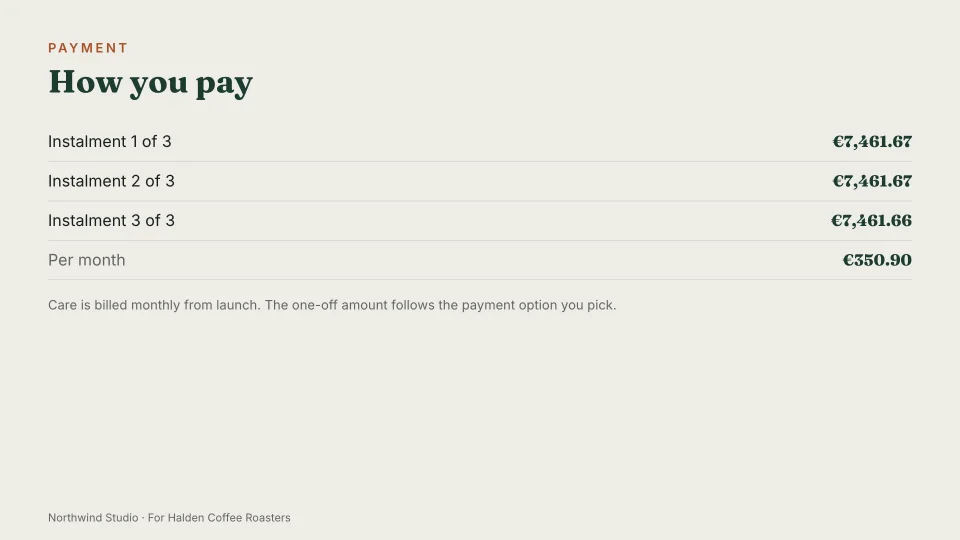
Payment plans the client picks
Offer up to four ways to pay for the project, and the client picks one on the pricing slide: 50/50, three milestones, pay upfront for 5% off, or monthly instalments at 5% more. A surcharge always reads “+5%”, never as a discount. You choose which plans are on and which one the deck opens with, and you can change a plan for one proposal without leaving the steps.
The payment slide, the terms, the agreement and the signed PDF follow the client’s pick: what is due at the start, at each milestone or each month, the days within which invoices are due, and your rate for extra work. With no plan on, the client reads one payment on signing.
Projects priced by who works on them
A fixed-price project can be priced by its people: pick them from your price list, set their days, and the day rates come from your price list. Add someone as an option, such as a senior developer for ten days, and the client can tick them in.
VAT that fits each client
Keep up to four VAT rates, such as 21% at home and 0% for a client abroad with a short note like “Export of services”, and pick one per proposal. Your prices can include VAT or have it added on top. The pricing slide, the agreement and the signed PDF name VAT in the proposal’s language. Propozit does not give tax advice: check which rate applies with your accountant.
Checks before you send
Before a proposal goes out, Propozit checks it the way a client would: a project with no project price, a team slide that does not match the people you priced, a length in the text that differs from the timeline, and Dutch or German text that mixes formal and informal address. A missing project price must be fixed before you send; the rest are pointers, each with a link to the place to fix it.
What you can use today
The price list, the pricing view and the deck editor are in accounts today: set up your lines, groups, deals, payment plans and VAT rates, see the live totals, and open a private preview link to try it as your client would. So are the rules you write yourself. You can send the deck to your client, who picks options and a way to pay, and signs in it. Create your account to try it.
Related
Proposals your clients actually say yes to
Propozit is free to start, with no card needed. Create your account today and see the plans on the pricing page.